
Automating the Feature Pipeline Deployment using CI/CD

The machine learning feature pipeline is an essential component of any data-driven organization that seeks to develop data-driven applications. It refers to a sequence of operations that transform raw data into features that can be used in machine learning models. These features are then used by machine learning algorithms to make predictions or classify new data. The feature pipeline plays a crucial role in the accuracy of the machine learning models, and any errors in the pipeline can result in inaccurate predictions. Therefore, automating the deployment of the feature pipeline is essential for any organization that wants to improve its machine learning processes.
Airflow is an open-source platform for creating, scheduling, and monitoring workflows. It provides a powerful interface for managing complex workflows, including those related to the feature pipeline. With Airflow, it's possible to define a workflow that incorporates all the steps of the feature pipeline, from data ingestion to feature engineering and model training.
One of the benefits of using Airflow is that it provides a flexible and extensible platform that can be customized to fit the specific needs of an organization. Additionally, Airflow has a robust set of operators and plugins that can be used to build complex workflows. For example, Airflow includes operators for data ingestion, data cleaning, and feature engineering, among others. These operators can be combined to build a workflow that meets the requirements of a specific organization.
Continuous Integration/Continuous Deployment (CI/CD) is a process of automating the deployment of software applications. It involves integrating code changes into a shared repository and then automatically deploying the changes to a production environment. CI/CD is an essential component of modern software development, and it can also be used to automate the deployment of the feature pipeline.
GitLab is a popular CI/CD platform that provides a robust set of tools for automating the deployment of software applications. GitLab's YAML syntax is particularly well-suited for building and deploying machine learning feature pipelines. With GitLab, it's possible to define a pipeline that incorporates all the steps of the feature pipeline, including data ingestion, data cleaning, feature engineering, and model training.
Additionally, GitLab's CI/CD platform provides powerful monitoring and alerting capabilities, which can be used to ensure that the feature pipeline is working correctly. For example, GitLab can be configured to send alerts if the feature pipeline fails to complete successfully or if the performance of the machine learning models degrades over time.
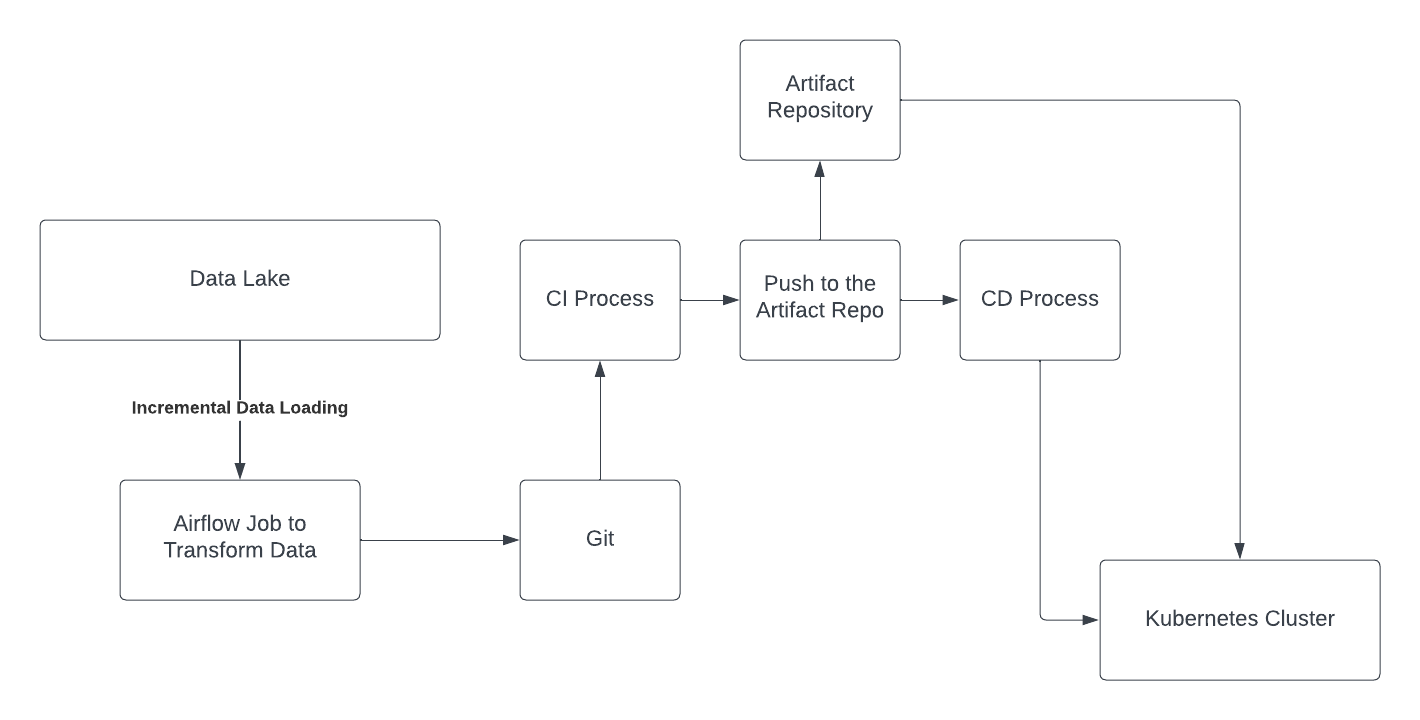
Figure 1: Automating the Feature deployment using the CI/CD process. The Airflow job is committed to the Git. After the code is committed, the CI process builds the Docker image of the Airflow job and pushes it to the Artifact Repository. After the docker image is in the Artifact repository, the CD process deploys the pipelines to the Kubernetes cluster using the docker image of the Airflow DAGs.
Below are the steps of deploying feature pipelines using CI/CD process
Commit the Airflow job code changes to Git repository.
The CI (Continuous Integration) process starts building a Docker image of the Airflow job from the committed code changes.
Once the Docker image is built, it is pushed to the Artifact Repository for storage.
The CD (Continuous Deployment) process then deploys the pipelines to the Kubernetes cluster using the Docker image of the Airflow DAGs.
The CD process may involve multiple steps such as scaling up the Kubernetes cluster, creating and configuring the necessary resources, and deploying the Docker image to the Kubernetes cluster.
Once the deployment is completed, the Airflow job is now available to run in the Kubernetes cluster.
The CI/CD process can be automated and triggered by events such as code changes or scheduled times to ensure that the latest version of the Airflow job is always deployed.
Continuous monitoring and testing can be implemented to ensure that the Airflow job runs as expected in the Kubernetes cluster.
In case of any issues, the CI/CD process can be configured to roll back the deployment to the previous working version of the Airflow job.
We will illustrate the steps by one example. Below is a DAG to run a simple pyspark operation
from airflow import DAG
from airflow.operators.python_operator import PythonOperator
from pyspark.sql import SparkSession
from datetime import datetime

default_args = {
    'owner': 'airflow',
    'depends_on_past': False,
    'start_date': datetime(2023, 4, 25),
    'email_on_failure': False,
    'email_on_retry': False,
    'retries': 1,
    'retry_delay': timedelta(minutes=5),
}

dag = DAG('pyspark_groupby_dag', default_args=default_args, schedule_interval=None)

def pyspark_groupby():
    spark = SparkSession.builder.appName("PySpark GroupBy").getOrCreate()
    data = [('Alice', 'Marketing', 25000),
            ('Bob', 'Sales', 30000),
            ('Charlie', 'Marketing', 28000),
            ('Dave', 'Engineering', 35000),
            ('Emma', 'Sales', 32000),
            ('Frank', 'Engineering', 37000),
            ('Gina', 'Marketing', 29000),
            ('Hank', 'Sales', 28000)]
    df = spark.createDataFrame(data, ['Name', 'Department', 'Salary'])
    result = df.groupBy('Department').agg({'Salary': 'mean'}).collect()
    for row in result:
        print(row)
    spark.stop()

pyspark_task = PythonOperator(
    task_id='pyspark_groupby_task',
    python_callable=pyspark_groupby,
    dag=dag
)

pyspark_task
We need to Dockerize this Airflow job to create the docker image of the feature pipeline. Below is the Dockerfile to dockerize the airflow jobs:
FROM apache/airflow:2.2.3-python3.8

# Install necessary system packages
RUN apt-get update && \
    apt-get install -y curl gnupg2 && \
    curl -sSL https://dl.google.com/linux/linux_signing_key.pub | apt-key add - && \
    echo "deb https://dl.google.com/linux/chrome/deb/ stable main" | tee /etc/apt/sources.list.d/google-chrome.list && \
    apt-get update && \
    apt-get install -y google-chrome-stable

# Install PySpark and dependencies
RUN pip install pyspark==3.2.0 pandas==1.3.4

# Copy the PySpark DAG file to the container
COPY pyspark_groupby.py /opt/airflow/dags/

# Set the working directory to the Airflow DAG directory
WORKDIR /opt/airflow

# Start Airflow webserver and scheduler
CMD ["bash", "-c", "airflow webserver & airflow scheduler"]
The docker file takes the airflow base image, install the spark to run the spark job . We could run the spark job in the EMR or Databricks for the large data workload.
We need to setup CI/CD process. Below is the Gitlab yaml file to setup the CI/CD process
name: Airflow Build and Deploy

on:
  push:
    branches: [ main ]

jobs:
  build:
    runs-on: ubuntu-latest
    steps:
      - name: Checkout code
        uses: actions/checkout@v2
      - name: Build Docker image
        run: |
          docker build -t my-dockerhub-username/my-airflow-dag:latest .
          docker push my-dockerhub-username/my-airflow-dag:latest

  deploy:
    runs-on: ubuntu-latest
    needs: build
    steps:
      - name: Checkout code
        uses: actions/checkout@v2
      - name: Deploy to Kubernetes with Helm
        uses: Azure/k8s-set-context@v1.1.0
        with:
          context: my-kubernetes-context
        env:
          KUBE_CONFIG_DATA: ${{ secrets.KUBECONFIG }}
      - name: Deploy with Helm
        uses: Azure/helm-v3@v1.1.1
        with:
          helm_version: "v3.5.2"
          command: upgrade
          chart: my-airflow-chart
          release: my-airflow-dag
          namespace: my-airflow-namespace
          set: |
            image.tag=latest
            image.repository=my-dockerhub-username/my-airflow-dag
In summary, setting up a CI/CD pipeline for feature deployment involves committing the Airflow job code changes to a Git repository, building a Docker image of the Airflow job using a CI process, pushing the Docker image to an Artifact Repository, and deploying the pipelines to a Kubernetes cluster using a CD process. By automating this process, organizations can ensure that their feature pipeline is always up-to-date and running correctly, leading to more accurate machine learning models and better data-driven applications.
Please subscribe to receive other updates about building Machine Learning System.